

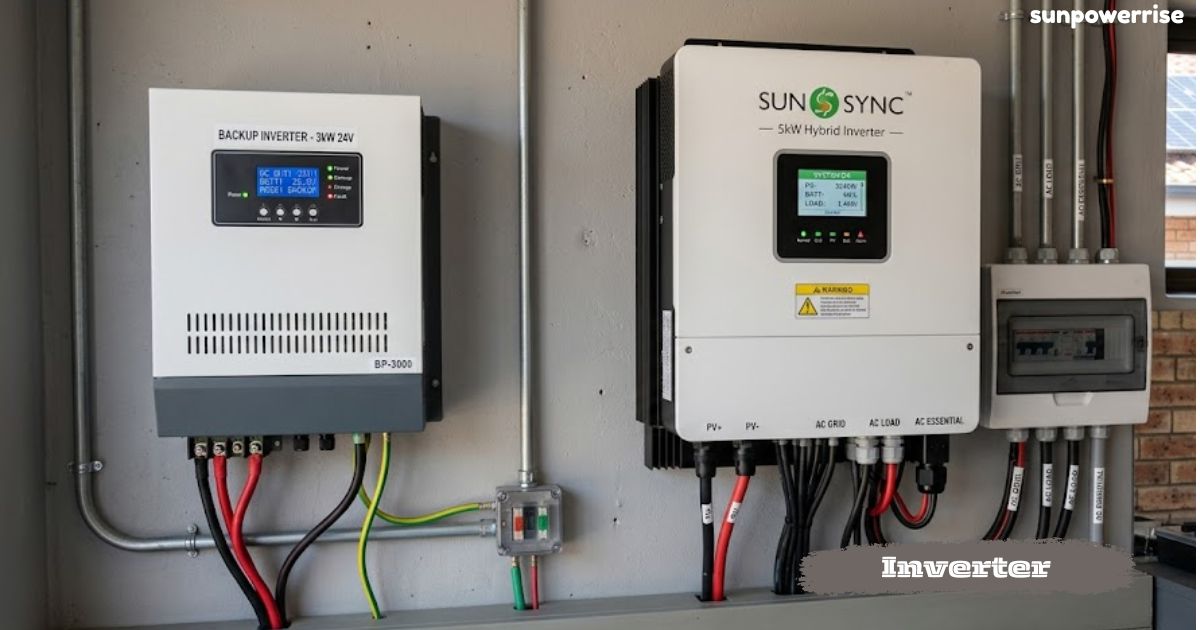
In every home, the installed inverter has a black terminal and a red terminal on the back end, and these connect to DC terminals that carry direct current from a battery or a solar panel.
On the front end, you find electrical outlets, and these AC electrical outlets give an AC supply that runs normal appliances, since this whole process turns DC electricity into alternating current, so our homes can use it safely.
Solar panels and battery banks store power as DC, and a rectifier can even flip AC back into DC when needed, though that is a separate topic.
Why We Need an Inverter (AC vs DC)
Most homes run on AC supply, since every plug and switch expects AC electricity rather than raw DC electricity from a battery.
Renewable sources such as solar panels and battery banks produce direct current, so a power inverter becomes the bridge that lets those batteries power normal appliances, lights, and even a car charger through the same electrical outlets we use every day.
I remember wiring a small setup at home where a DC bulb worked through a direct connection, but the moment I wanted an AC lamp to glow, I had to bring in an inverter instead, and once connected, the lamp lit up instantly.
An AC bulb cannot run straight off a battery, and this is exactly why an inverter matters so much in daily life.
A DC bulb can be wired directly to a battery without any conversion, but if you replace it with an AC lamp, only an inverter can make it glow safely.
IGBTs, Switches & Controller
Inside every inverter, a set of IGBTs acts as electronic switches, and a controller opens and closes switch one, switch two, switch three, and switch four in pairs to guide the current direction from a DC source.
When switch one and switch four close together, current flows one way through the load, such as a lamp, and when the controller opens those and closes switch two and switch three, the flow reverses, changing the direction along a new path.
Repeating this pattern 100 times per second gives 50 hertz electricity, while doing it 120 times per second produces 60 hertz output, and this switching action is what turns steady DC into usable AC electricity.
Since the input is low voltage, the raw output stays low too, so a transformer is needed to step up the voltage from around 12 volts to a useful 120 volts or 230 volts.
The four switches work together at high speed, and this constant cycle of current and controlled flow across the switches turns a battery into steady AC electricity, and that is the real engine behind every inverter-based electricity system.
Waveform Shape & Pulse Width Modulation
If you connect an oscilloscope to a basic inverter, you see a square wave sitting in the positive region and the negative region, and while this is technically AC, it looks nothing like a smooth sine wave.
To fix this, the controller uses pulse width modulation, breaking each cycle into small segments and sending out a pulsating pattern where every pulse changes in width, so the switches open and close many times within one cycle.
This rapid switching creates an average current in each segment that rises and falls smoothly, and the load ends up seeing a proper wave instead of a harsh square shape.
By adjusting the timing of each pulse, you can control the output voltage, producing 120 volts or 240 volts as needed, and by changing the frequency, you can generate 50 hertz, 60 hertz, or even 30 hertz depending on the appliance.
This is exactly how a 12-volt DC battery, paired with a transformer, ends up delivering clean current at the right voltage and frequency for your home.
Solar Panel to Charge Controller Connection
Connecting a solar panel straight to a battery is risky because the DC power supply from the panel keeps changing in voltage, so a solar charge controller sits in between to keep things safe.
The panel first feeds an input power supply into an MCB, and from the MCB’s output terminal, one wire runs to terminal one on the charge controller, marked with a plus symbol, since that is the positive terminal for the panel side.
A second wire leaves another point on the MCB and goes to terminal two, which carries the negative terminal connection marked with a minus symbol.
Once both wires are in place, the solar charge controller manages the flow between the panel and the battery on its own. This small box protects the battery from voltage swings that a raw solar panel connection could otherwise cause.
Protection Devices MCB & SPD
Good protection matters just as much as good wiring, and this is where the MCB and the SPD earn their place in any inverter setup.
The MCB guards against overload and short circuit, cutting power the moment something goes wrong, while the surge protection device, or SPD, handles sudden spikes that a normal breaker might miss.
To wire an SPD, you loop the negative wire to its negative side and connect the positive wire to its marked positive point, then run a wire to the earthing terminal so the whole system has proper earthing.
If a voltage surge ever hits the line, the SPD will safely ground the voltage away from your home devices instead of letting it damage them. This kind of protection is cheap compared to replacing burnt-out appliances after a bad surge.
Powering a DC Bulb Directly from the Charge Controller
A charge controller usually has its own small DC power supply terminal for direct use, separate from the battery output.
If you connect the positive terminal to one leg of a bulb and the negative terminal to the other leg, that bulb will glow directly from the solar panel.
The catch is simple: the moment electricity production from the panel stops, that same terminal goes quiet, and the bulb turns off right away.
Adding a Battery for Power When the Sun Isn’t Producing
To keep a lamp glowing even at night, you need to add a battery to the charge controller setup. Connect the positive terminal on the controller to the battery’s positive side, and the negative terminal to the battery’s negative side, so the power supply keeps flowing both ways.
During the day, the solar panel handles electricity production and charges the battery at the same time, and once that production stops, the same battery quietly takes over and keeps the lamp lit through the night.
Connecting the Inverter to Power Home Lights
At the back of the inverter, two cables run straight to the battery, and you can pull this connection from the battery terminal or straight off the charge controller if that is easier.
The inverter has a socket built in, and it gives out a proper AC power supply, so I usually wire a plug top with two wires inside, one carrying the phase supply and the other carrying the neutral supply, before connecting it to a bulb.
Once that plug top clicks into the socket and I flip the switch, the bulb lights up instantly, and the same trick scales up nicely for home lights.
Instead of wiring just one bulb, you can route the plug top’s power supply through your home’s lighting MCB, and every point connected to that MCB will then run off the inverter. This is exactly how a full home backup works during a power cut.
Connecting a Sonax Inverter to Wi-Fi
Setting up Wi-Fi on a Sonax inverter starts with a laptop, since you need to open its wi-fi settings and look for a network named after the dongle’s serial number.
Once you connect to that network, open your internet browser and type code 5.8 into the address bar, and this brings up a settings page asking for a username admin and password admin, both in lowercase letters.
From that settings page, pick your home wi-fi network from the list, enter your wi-fi password in the box provided, and hit save to link everything together.
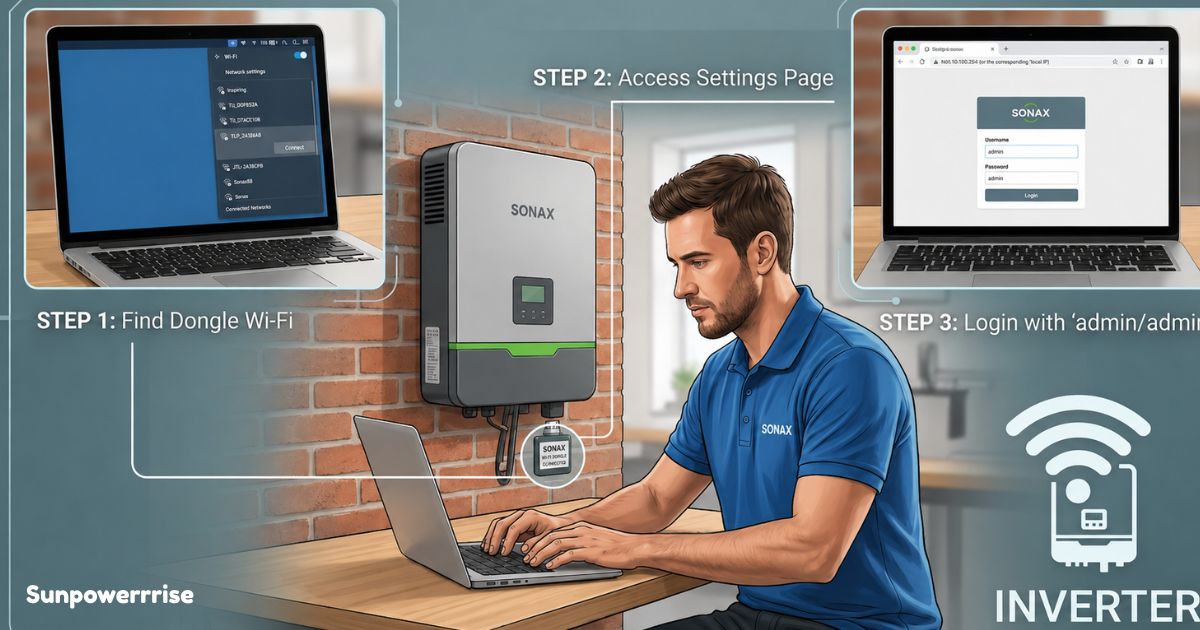
A short waiting screen appears next, and after about 15 seconds, the inverter should connect on its own without any extra steps from you.
Check the dongle for a red light to confirm status. A solid red light means success, while a flashing red light means the connection is unsuccessful message will appear, and you need to repeat the whole process again.
FAQs
What does an inverter do?
An inverter converts DC electricity from a battery or solar panel into usable AC power for home appliances.
Why can’t a DC bulb glow on normal home wiring?
Home wiring carries AC electricity, so only an AC bulb works directly, while a DC bulb needs a direct connection to a battery.
What role do IGBTs play inside an inverter?
IGBTs act as fast electronic switches that a controller opens and closes in pairs to create AC electricity from DC.
Why does an inverter need a transformer?
Since the input is low voltage, a transformer steps it up to a usable 120 volts or 230 volts output.
How do I know if my Sonax inverter connected to Wi-Fi successfully?
Check the dongle for a solid red light, since a flashing red light means the connection unsuccessful and you must repeat the setup.