

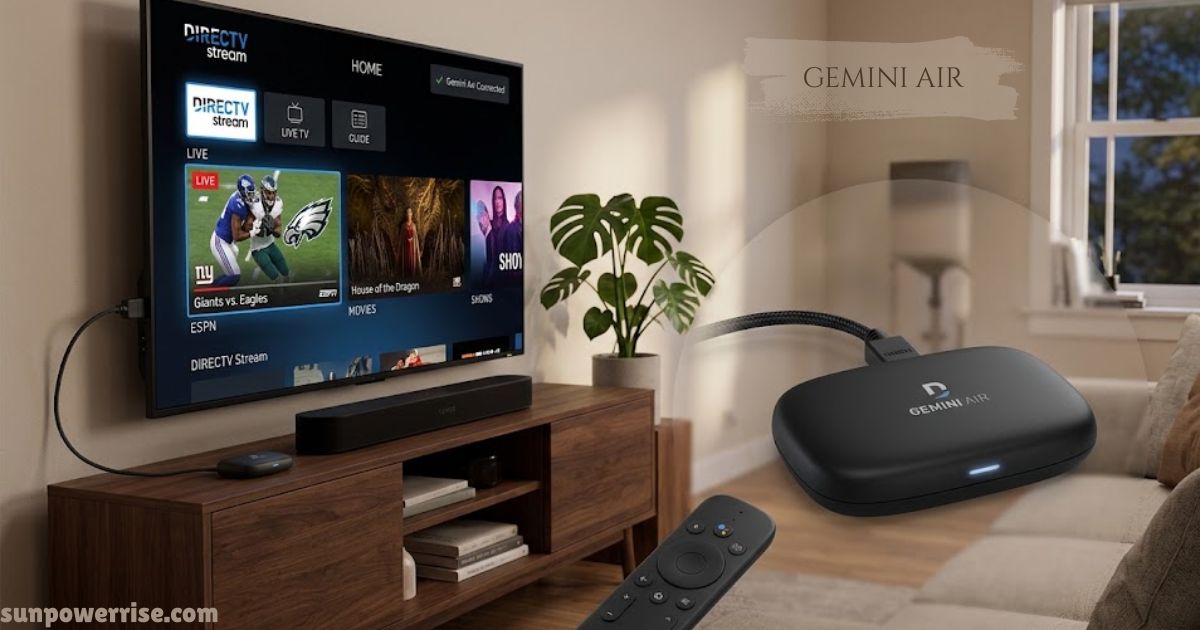
Gemini Air is a compact streaming device made for DirecTV’s streaming service, designed to replace the traditional satellite dish and separate cable box setup.
Let’s talk about the Gemini Air, because this little device is quietly changing how people watch TV at home. I’ll keep this real: five years back, my house was full of tangled remotes, and switching from the news to a movie on Netflix felt like a chore nobody asked for.
Gemini Air
The Gemini Air is a compact streaming device, almost a tiny dongle, that plugs right into your TV’s inputs and skips the satellite dish entirely. No more juggling five apps or hopping between a cable box and a separate box just to catch live TV.
This is a nice segue into what makes DirecTV’s customers excited: one unassuming stick, one interface, and a live cable experience sitting right next to your favourite streaming services. The benefits are obvious the moment you plug this thing in and jump straight into entertainment without any fuss.
Design & Compact Form
Setting up the Gemini Air feels almost too simple compared to old cable boxes. Everything arrives in one Box, and the setup guide inside is barely needed because the plug-and-play design walks you through it on screen.
Setup
This small, lightweight, compact device fits right in your hand or palm, so it never feels like carrying home extra hardware. You get a power brick with an attached power cable, a USBC cord that clips into the USBC port, and an HDMI cord that connects through the HDMI port on the back of your TV.
There are no messy cables running across the wall, which makes the whole thing feel genuinely portable. Once it’s plugged in, you enter your Wi-Fi credentials, confirm the Wi-Fi connection, and let it run an update; instead of staring at a blank screen, it throws in a bit of trivia to keep you entertained while it finishes.
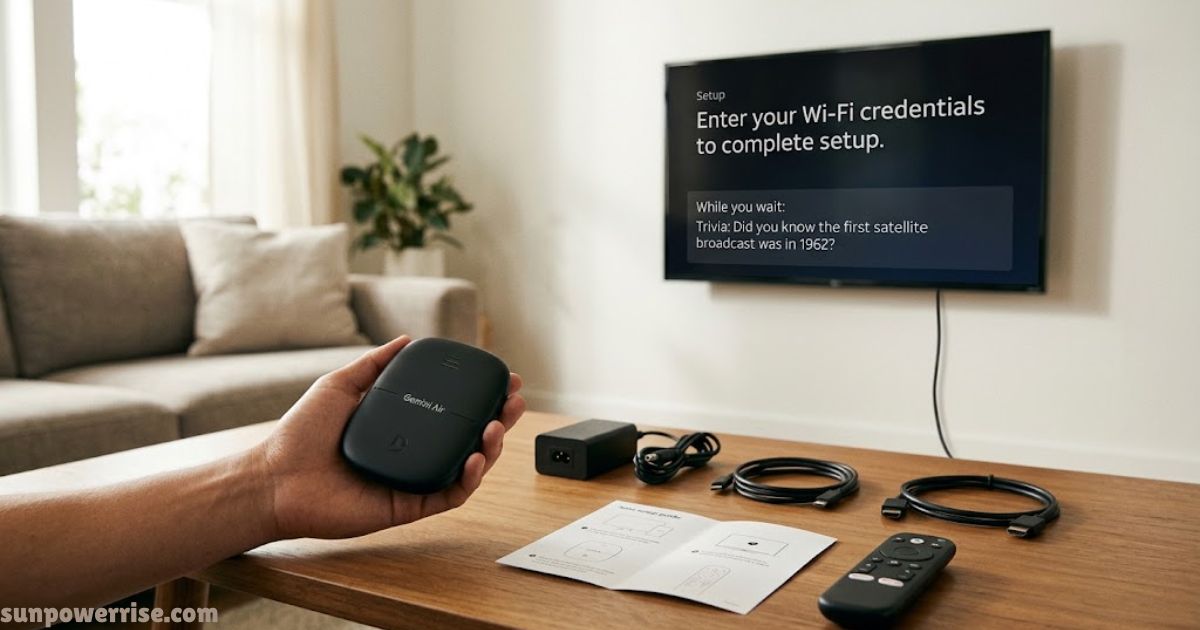
The remote has simple buttons to follow the on-screen instructions, a status light to confirm it’s working, and a reset button if anything goes wrong.
From here, you customise your channels to match the DirecTV experience you actually want, and if the internet feels spotty during a big game, that’s the one moment the live TV feed might buffer. Beyond that, this streaming device comes backed by a solid 2-year warranty, so the setup you did once should keep working for years, no satellite dish required.
Picture & Audio Quality
Being a bit of a TV nerd myself, I worried I’d be sacrificing on picture quality with something this small, but that fear disappeared fast.
The Gemini air pushes 4K video with 4K HDR, so the colors really pop, whether you’re watching a slow nature documentary or a loud action flick. Everything looks sharp, and support for 422 chroma shows the engineering behind this went deeper than expected. On the audio side, you get surround sound, though there aren’t any manual options to fine-tune it yet.
Remote & Voice Search
The remote that comes with this deserves its own mention. It has real weight to it, nothing like those flimsy plastic clickers that feel cheap the moment you pick them up; this one feels genuinely premium.
Navigating through channels, apps, and live TV is smooth thanks to a user-friendly form factor that includes a numeric pad and a dedicated button for jumping straight into streaming services. Built-in Google Assistant handles voice search and voice commands with impressive accuracy; I’ve tested it in a noisy room and it still stayed accurate without me repeating myself.
Software Interface
The software running this cable TV experience is where the Gemini Air really shines. Compared to cheaper streaming sticks that feel stuttery and sluggish, this one stays snappy and responsive no matter how many menus you open.
Everything sits in a left column: search by voice, by channel name, or by channel number, and it takes you straight there. The home screen shows trending picks and lets you jump back into whatever you were watching, while a dedicated Sports row pulls in live scores and sporting content you actually follow.
Streaming Aggregation
The whole layout is organized and easy to use, keeping your channels, TV shows, movies, and content in one place instead of scattered across a dozen apps, all tucked neatly into your favourites tab for quick access.
This aggregation experience and app experience bring Netflix, Hulu, HBO Max, and Disney Plus into the same screen as your live games, and every app gets its own channel number so it feels fully integrated with regular TV.
Live TV
Even the DirecTV app on your smartphone or tablet lets you cast shows to your Smart TV or set the remote as a universal remote, sending out signals so smoothly that the whole thing feels genuinely seamless. Whether you want to watch live TV, catch up on sports, or just browse, and if the built-in suggestions don’t guess right, typing in a title works just as well through search.
DirecTV Ecosystem
It’s worth being upfront about one thing: this isn’t a generic streaming box you buy once and forget about; it’s built around the DirecTV Gemini Air ecosystem.
If you just want a standalone device for random apps, there are cheaper ways to get that. But if you’re already committed to the service and you want that traditional cable feel, complete with cloud DVR so you never lose track of shows you missed, this hits a real sweet spot.
Minor Drawbacks
No product is perfect, and this dongle has one small quirk worth mentioning: after a long binge-watching session, the hardware can get a little warm. It’s nothing alarming, but if your HDMI port sits in a tight, poorly ventilated space behind your living room TV, keep an eye on it. Beyond that, the setup stays smooth, and the whole package feels genuinely polished and convenient.
FAQs
How much does DIRECTV Gemini Air cost?
The Gemini Air device usually comes included at no extra cost when you sign up for a qualifying DIRECTV package, so you’re mainly paying for your monthly service, not the hardware itself.
Is Gemini Air worth the cost?
Yes. For most cord-cutters, the Gemini Air feels worth it because it replaces a satellite dish, unlocks 4K HDR, and bundles live TV with streaming apps like Netflix and Disney Plus in one seamless device.
What does a Gemini Air device do?
The Gemini Air is a compact, plug-and-play streaming device that connects through HDMI, letting you watch live TV, on-demand content, and your favorite apps all in one place, satellite-free.
What are the key differences between the DIRECTV Gemini and Gemini Air?
The standard Gemini is typically a set-top box built for satellite or wired setups, while the Gemini Air is a smaller, wireless dongle-style device made purely for streaming over Wi-Fi.
Do I need a Gemini Air device for each TV?
Yes, since the Gemini Air connects directly to a single TV’s HDMI port, you’ll need a separate device for each TV where you want the full DIRECTV experience.
Is Gemini worth it for DIRECTV?
Absolutely, the Gemini hardware is the backbone of the modern DIRECTV experience, making live TV, cloud DVR, and streaming services feel genuinely effortless and integrated.