


Framer pricing confuses more people than it should I have watched clients open two proposals for the same 10-page marketing website and stare at numbers that make no sense together: one vendor says $8,000, another says $35,000. Neither quote is wrong.
The gap comes down to scope, complexity, and the expertise behind the work, because a solo freelancer’s idea of a straightforward site rarely matches what an enterprise agency builds with full QA frameworks in place. Once you see the patterns behind every proposal, budgeting stops feeling like guesswork.
This guide pulls together real pricing information from agencies, freelancers, and subscription programs so you can set budgets realistically and read proposals with real clarity, covering the calculation method behind project pricing, genuine pricing from retainers, and a comparison framework for judging every agency tier, resource, and correct decision in front of you.
Framer Pricing Plan Overview
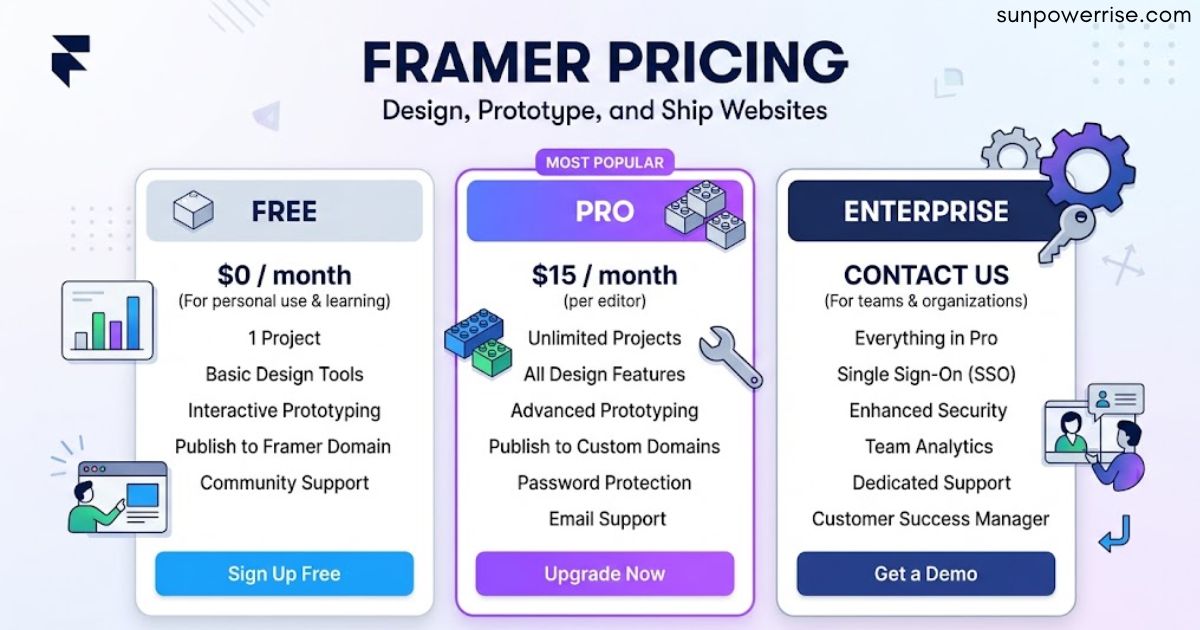
Understanding Framer pricing starts with the plan structure itself: Framer runs four plan tiers Mini, Basic, Pro, and Business. Mini works as an entry point for personal sites and experiments on a Framer domain, while Basic adds a custom domain, more pages, and higher traffic limits, which is where most solo founders and small business sites land.
Pro unlocks the CMS, staging, password protection, and other advanced features that a content-driven site needs, and Business sits above it with the highest limits, real team collaboration tools, and priority support.
Every step up from Mini mostly removes a limit page count, CMS items, team seats because the design experience and publishing experience barely change between tiers; I’d sum up the feature comparison like this: no Framer branding, CMS collections that go from limited to expanded, and a staging environment that agencies handling high traffic and content sites genuinely rely on.
On the current pricing page, checked this July, you’ll see Free, Basic, Pro, and Enterprise instead, with yearly billing starting at 10 dollars and 30 dollars a month, and Enterprise priced as fully custom. I always tell clients to treat that as a starting figure, because your billing cycle, tax, extra seats, and any add-ons change the number shown at checkout check the current plans yourself before you commit to anything.
Team Seats and Collaboration Costs
Pro and Business both support multiple editors, but the seat limits differ Pro stays at a small team, Business scales further. Running an agency means every client work engagement needs its own client site plan or a spot under your team account, and since there’s no true agency tier with white-labeling, you’ll manage client accounts one by one or pass the subscription cost straight through, which I’ve had to factor into my own agency pricing model more than once.
Viewers cost nothing, but additional editors run 20 dollars a month, and content editors run 10 dollars a month on both Basic and Pro, so the moment a client, writer, marketer, or extra team member needs real access, your neat site price turns into something bigger; plan for that edit access cost up front instead of getting surprised by the budget later.
Choosing the Right Framer Plan for Your Project
Getting framer pricing right for your project usually comes down to one habit: most people over-plan. Pick the tier that matches your current project, not the one you hope to grow into, because Framer makes upgrading simple and your work transfers cleanly between plans.
A founder launching a SaaS landing page should start on Basic and move to Pro once a blog or documentation section needs the CMS, while an agency should start on Pro and only reach for Business when a specific client project genuinely needs the higher limits.
Start on Free if you’re still figuring Framer out, pick Basic for a clean small site on your own domain, and pick Pro once the site becomes part of your actual business and you want room to grow without watching the plan limits and if you’re building for a template store, know that everything on Framer stays fully customised to your own brand rather than boxing you in.
The Straightforward Calculation for Framer Website Pricing
Once you strip away the noise, Framer pricing for custom projects reduces to a clear formula that explains roughly 90% of the variation you’ll see across proposals: Estimated Cost equals Project Complexity times Agency Level times $3,000.
This calculation works because complexity sets the volume of work required, while agency level sets the rate and process overhead a team brings to that work; your geography, timeline urgency, or a vendor’s standing nudge the number up or down but never drive it.
Once you understand these two multipliers, you can check whether a proposal sits near market standards for the quality tier you asked for, or whether you’re paying excessive amounts for the same output.
Market-Validated Pricing Ranges for Framer Builds
If you want real numbers behind framer pricing at the project level, these figures come from market rates, transparent agency pricing, confirmed proposals shared in developer communities, and real retainer offerings, so treat them as sanity checks once you combine your complexity tier with your chosen agency quality tier.
Small Projects
For small Framer projects at 1-10 pages, freelancers land around $1,800-$4,500 based on consistent quotes for fundamental builds, small studios run $3,600-$9,000 given their capacity-based pricing and studio overhead, mid-level agencies run $7,200-$18,000 with dedicated account management.
Medium Projects
For medium Framer projects at 11-40 pages with CMS, expect $4,500-$9,000 from experienced independent developers, $9,000-$18,000 from small studios offering team backup, $18,000-$36,000 from mid-level agencies running proven delivery systems and comprehensive QA coverage, and $31,500-$63,000 from top agencies running full strategy phases and specialized development the wide pricing variance here tracks design sophistication, interaction complexity, and integration depth.
Large Projects
For large Framer projects at 41-100 pages with heavy interactions and integrations, freelancers rarely go past $18,000, small studios run $18,000-$36,000 with proven capacity management, mid-level agencies run $36,000-$72,000 through dedicated teams, and top agencies run $63,000-$126,000 with full enterprise-grade procedures and comprehensive support, since these builds need sophisticated CMS architecture, custom interaction libraries, real design systems, and dedicated team coordination across 2-4 months.
Enterprise Projects
For enterprise Framer projects at 101-200+ pages with multi-locale, API, migration, and QA needs, small studios quote $18,000-$51,000, mid-level agencies quote $72,000-$102,000, and top agencies quote $126,000-$178,500+ across 3-6+ months, covering multi-language capabilities, custom API integrations, careful content migrations that preserve SEO value, and full accessibility compliance.
Why I Still Use Framer
After all this, Framer pricing still doesn’t scare me off because I keep coming back to Framer; it moves an idea into a good-looking, live site fast, while still giving me enough control.
That’s also why the plan decision matters: the right plan should stay out of your way, so you’re never wondering whether your blog or template library has outgrown the setup you chose just to save money early on. Always trust the live source over an old screenshot, video, or blog post, since the current structure changes faster than most guides update.
How Framer Agent Credits Work
Framer Agents confused a lot of people when they launched, and the pricing felt scattered at first glance until you see what the AI credits actually do. Each workspace shares a monthly pool Free workspaces get 500 credits, Basic gets 1,000 credits per paid site, and Pro gets 3,000 credits, all of which stack together if you run more than one paid site.
This isn’t a fixed cost per prompt and it isn’t a separate team allowance for every person; a quick edit uses fewer credits, while a bigger job touching pages, CMS content, or layout uses more credits. Credits reset on the first day of the month and do not roll over, and once you hit the limit, the credit-using tools pause while any request already running gets to finish, since Framer keeps lighter editor helpers working regardless.
Choosing Between Framer Pricing Models for Your Situation
Not every model of framer pricing fits every project. Different pricing structures fit different operational needs, so match your choice to your real workflow requirements instead of chasing perceived savings.
Pick fixed pricing for a one-time build with defined scope, when budget certainty beats flexibility, when you can write out detailed requirements up front, when your timeline allows room for proper scope documentation, and when you want real contractual protection around deliverables.
It suits new site launches, complete redesigns, and projects with clear endpoints, but it struggles once requirements evolve and you need continuous iteration. Pick retainer models for ongoing maintenance after site launch, a predictable monthly update volume of 20-100 hours, relationship continuity with your developer, real response time SLAs, and predictable monthly costs over variable project billing.
Pick subscription services for continuous small-to-medium updates, discrete tasks, tolerance for serialised work and one request at a time, comfort with 48-72 hour turnarounds, and budget predictability over raw execution speed.
FAQs
How much does Framer cost?
Framer runs on a simple plan structure. Free costs nothing, Basic starts around 10 dollars a month, and Pro starts around 30 dollars a month, with Enterprise priced as custom.
Is Framer paid or free?
Framer offers both, the Free plan gets you started at no cost, while Basic, Pro, and Enterprise unlock a custom domain, more CMS collections, and higher bandwidth.
Is Framer 100% free?
Not fully, the Free plan covers the core design environment and basic CMS, but a custom domain and higher limits need a paid plan like Basic or Pro.
Is Figma better than Framer?
It depends on the job: Figma wins for design and prototyping, while Framer wins as a real site builder that publishes a live, working website, they solve different problems well.
Is Framer worth the money?
For most content-driven sites, yes. The CMS, staging, and custom domain you get on Basic or Pro genuinely save time and give real peace of mind once a site matters.