

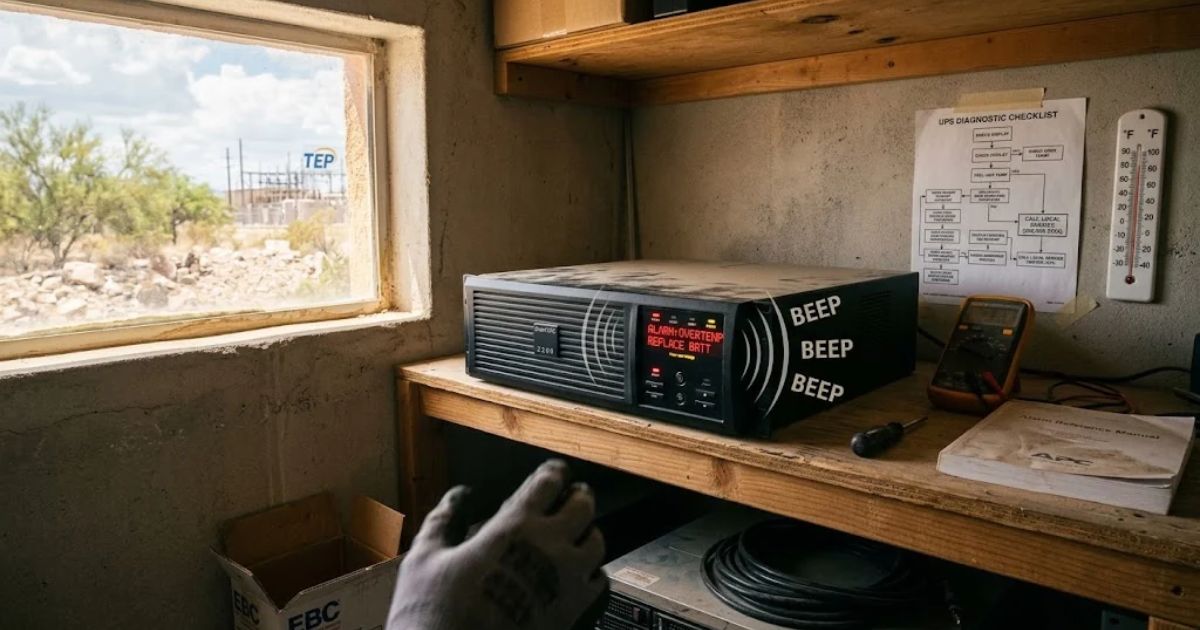
Beeping UPS units, whether a home and office UPS or a larger uninterruptible power supply, are asking for help. In Tucson, summer heat pushes gear hard, so continuous beeping deserves a quick look. This guide explains each UPS alarm in plain words.
What does that beep from my UPS actually mean?
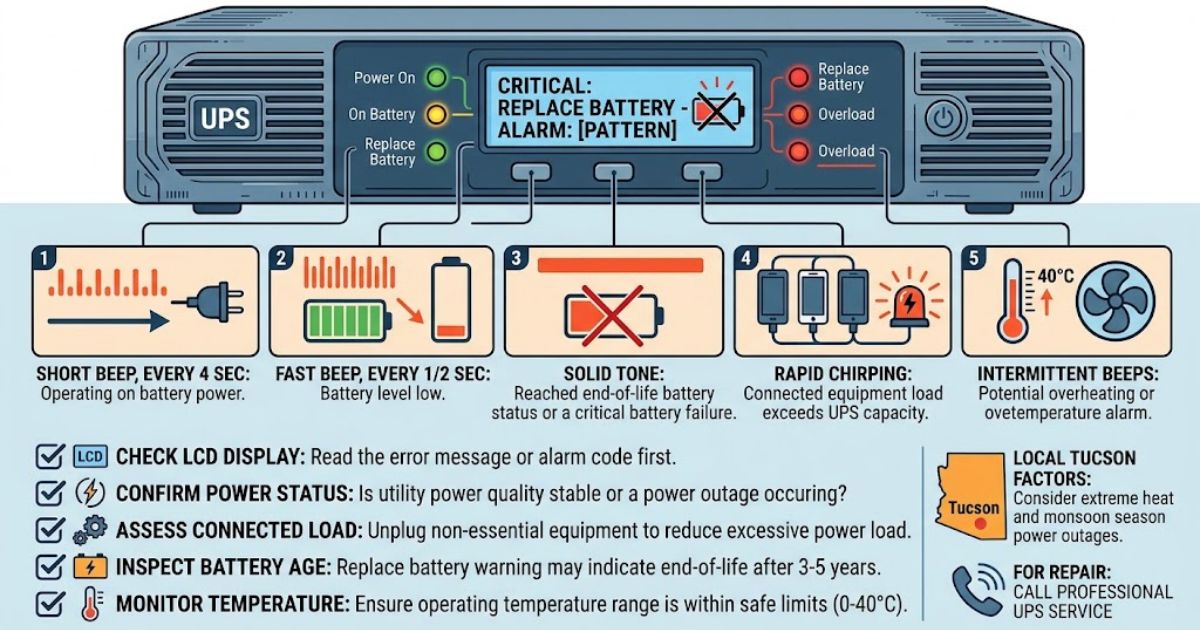
A beep is a message, not random noise or a glitch. Your UPS uses an audible alarm to report changes in power, and each beep pattern matches one condition. A steady solid tone and a slow intermittent beep mean very different things.
Some models add a chirp every four seconds, which often means a loose internal battery. The beep frequency usually speeds up as trouble grows, so listen before you touch anything. Read the LCD display too, since its error message says more than sound alone.
How do I read the alarm codes and warning lights?
Check the screen and lights first, then match them to the sound you hear. An alarm code or fault code names the problem faster than guessing. A red LED indicator or fault light means act today, not next week, so take it seriously.
Each brand words these signals differently, so keep the alarm reference manual near the unit. A visual alarm or warning indicator can appear without any sound, so glance at the panel often. Many alerts are harmless, and a false alarm happens more than people expect.
Why does my UPS beep when the power looks fine?
Your UPS may sense a problem that you cannot see or hear. It could be running on battery after a brief dip, or sitting in battery mode because the input voltage drifted. Lights can stay on while utility power quality drops.
A short mains outage or a longer power outage makes the unit switch and sound off. Any power event, including utility power loss during a storm, triggers the same warning. Summer storms cause many alarms, so check local news before you blame the hardware.
What voltage problems make a UPS beep?
Bad voltage forces a UPS to work harder, and that extra effort makes it beep. Out-of-range voltage, steady voltage fluctuation and unstable electricity all cause frequent switching between mains and battery. Poor power quality also wears the unit down, even when lights never flicker.
A missing neutral, phase reversal or site wiring fault points at the building, not the UPS. Units with automatic voltage regulation fix small swings quietly, though AVR Boost or AVR Trim may click. Call for service if you see output voltage drift, and restore utility power only after the grid steadies.
How do I know the battery is the problem?
Batteries cause most of the beeping calls that service teams get. A low battery or weak battery shows up as short runtime, sudden shutdowns or alarms on steady power. Many units report battery self-test failure long before the battery fully dies.
Watch for a replace battery warning or a battery needs replacement message. At end-of-life battery status, battery failure can arrive without notice, and a critically low battery alert means shutdown is minutes away. Check battery age first, since most packs fade after three to five years.
How long does a UPS battery last?
A typical VRLA battery lasts three to five years, and heat shortens that. Battery lifespan also depends on temperature, discharge cycles and everyday care. Plan proactive battery replacement before the pack fails, because waiting raises the odds of a sudden shutdown.
A lithium-ion battery can last closer to ten years, though it costs more upfront. Run a battery capacity test each year, then compare battery health in the software with your battery voltage check notes. When the time comes, use a battery recycling program instead of the trash.
What if the battery looks swollen or smells strange?
Stay away from the unit and call a technician right now. Battery swelling, battery leakage or a sulphur smell means the cells are failing and may vent. Keep people clear, open a window, and never charge or move the unit yourself.
Look for white powder or corrosion around the terminals during each inspection. Check the internal battery and any external battery pack; open the battery cabinet only when the manual allows. A battery string needs matched blocks, so never swap just one; buy the right replacement battery cartridge (RBC).
Does overload make a UPS beep, and how do I fix it?
Yes, an overload condition makes a UPS beep when the connected load exceeds UPS capacity. Unplug non-essential equipment first, then compare total wattage with the rated capacity on the label. Continued excessive power load adds heat and shortens battery life.
Many people misjudge load in VA or watts, so check the load-to-nominal power ratio and run a quick load assessment. Proper UPS sizing leaves about 20 percent spare room, and good load management spreads devices across outlets. If needs grow, upgrade to higher capacity, cut power consumption, and suspect a short circuit when the alarm persists.
Can heat or dust make a UPS beep?
Yes, and Tucson’s climate makes it much more likely than in cooler cities. Over temperature alarms rise when a room runs hot, and overheating damages batteries first. Tucson extreme heat can push a closet or garage far past a safe range in July.
Most units want a room between 0 and 40°C, so respect the operating temperature range. Cooling fan failure, poor ventilation and dust buildup choke airflow and trigger alarms. Clean the air filters, improve heat extraction, add air conditioning to tiny closets, and watch humidity too.
What local risks should Tucson owners know about?
Arizona’s weather stresses power gear in three ways: Arizona summer temperatures, monsoon season power outages, and dust storms and UPS airflow restrictions. Each one can start an alarm, even on a healthy unit. Knowing the season helps you spot the cause faster.
Tucson Electric Power (TEP) serves most of the city, so check its outage map first. Lightning and power surges hit during monsoon storms and can damage a board even when building power stays on. A local UPS technician knows these patterns and often arrives faster than a remote warranty desk.
What internal faults cause a red light and constant tone?
An internal fault usually brings a constant tone and a red light on the front panel. A hardware malfunction means the unit cannot protect your gear reliably. Stop using it for critical devices until a trained professional checks it out.
Common culprits include circuit board failure, power board failure, a rectifier fault, an inverter fault and a sensor error. Aging parts matter, and capacitor replacement often revives units that are several years old. Install each firmware update from the maker, since updates fix some glitches.
What can I safely fix myself?
You can silence the alarm, read the display, trim the load and check the room. Stick to the safe actions that your manual lists for owners. Leave panels and wiring to a qualified technician, because a UPS stores energy even when unplugged.
Run a self-test, then reset the UPS by following the power down steps and waiting a few minutes. Next, restart the UPS and confirm the safe shutdown feature still works. Follow each manufacturer procedure exactly, and respect electrical safety standards and the electric shock risk.
How do I protect my equipment while the UPS beeps?
Stay calm, grab your checklist and act in order. If the unit warns of imminent shutdown, begin your shutdown procedure at once, closing the busiest programs first. Save your work first, because your files matter more than the UPS itself.
Never touch bypass mode or a maintenance bypass switch yourself, because the load then runs with no battery behind it. Avoid hot-swap attempts unless the manual allows them, and leave circuit breakers alone. Protect your critical load and sensitive electronic devices first, since data loss prevention beats repair.
How do I diagnose the problem in ten minutes?
Use a short checklist: note the display, check power, check the battery, check load, check heat. A quick diagnosis saves time and avoids guessing and repeated resets. If you find no root cause in ten to fifteen minutes, call for help.
Practical tip: a written diagnostic checklist keeps staff calm, and a diagnostic flowchart on the wall helps new employees. Use a multimeter or voltage meter only if you have training; otherwise, let an electrician measure. Work through the troubleshooting steps in order, and record each result for the incident report.
What should I gather before I call for help?
Write down the model and serial number, the firmware version and the exact message on the display. Add your maintenance history and note when the alarm began. This lets technical support diagnose the issue much faster, often in one call.
Pull event logs from your software, including SNMP data, PowerAlert software reports or USB/RS232 logs, and photograph the screen. Sites with remote monitoring often get alerts before beeping starts. Larger firms also run a ticketing system with an escalation path, while your user manual lists support lines.
Which UPS brands and types beep differently?
Each brand uses its own beep patterns, and even product lines differ. APC Smart-UPS and APC Back-UPS differ from each other, and Eaton UPS and Vertiv Liebert units follow their own logic. Always check your exact model before trusting a chart online.
Tripp Lite, Riello UPS, Delta UPS and Schneider Electric add more variety. Design matters too, since line-interactive UPS, online double-conversion UPS and standby UPS models alert differently. Offices may run single-phase UPS, three-phase UPS, rack-mount UPS, modular UPS or server room UPS gear, and a data center may mix them.
When should I call a professional in Tucson?
Call a pro when a persistent alarm continues after you fix the battery, load and heat. Also call for any burning smell, visible damage or error you cannot decode. Searching UPS repair Tucson or UPS service Tucson AZ finds local help quickly.
Ask about emergency UPS service, 24/7 on-call support and a fast response time. A service contract, a UPS maintenance plan and preventive maintenance every three to six months catch problems early. Business owners seeking commercial UPS Tucson coverage should request battery replacement service, UPS repair and UPS installation quotes.
How can I stop my UPS from beeping again?
Maintain it on a schedule, size it for your real load and keep the room cool. These tips to prevent UPS beeping cost little compared with an emergency visit. Regular checks stop most alarms long before they ever start.
Add environmental monitoring to track heat, plus surge protection and power protection at the wall. Smart backup power planning improves uptime and cuts downtime, which supports equipment protection. Small habits now save you from a costly outage later this year.
Quick FAQs
Is a refurbished UPS worth it?
A refurbished UPS can be worth it if the seller supplies a warranty and proof of load bank testing. Always check the new battery date, since old packs ruin the savings. Ask the seller whether they service the unit locally.
Why does my UPS beep after power returns?
The unit may still be in battery charging mode, and the beep warns that backup time is short for now. A battery disconnected message or poor battery runtime points to a deeper problem. A normal startup confirmation tone is brief, so a repeated alarm needs attention.
Do I need a licensed electrician or a UPS technician?
Call a licensed electrician for building wiring faults, and call a UPS technician for the unit itself. Knowing when to call a professional is simple: call whenever safety feels uncertain. Any power failure that keeps repeating also deserves expert attention.