


If you have ever asked yourself what is a mailing list, I can tell you it clicked for me the moment I built one myself. My first email list started with just twelve people who somehow trusted me, and that humble beginning taught me more about real marketing than any course ever could.
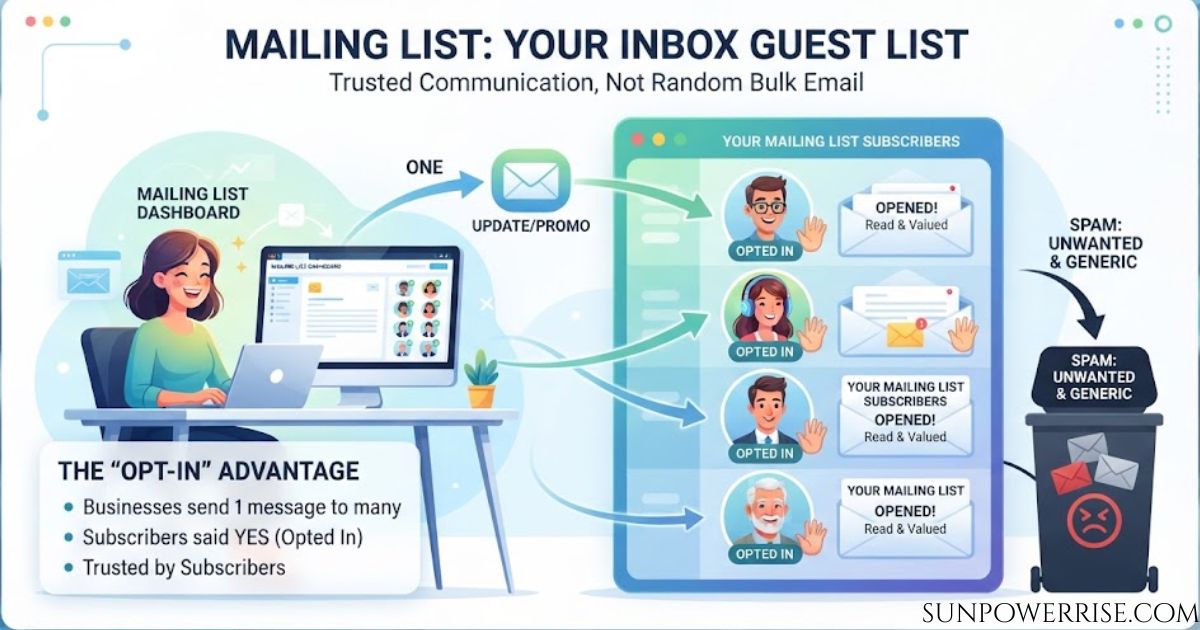
A mailing list is essentially an inbox guest list that lets you send one message to many people at once, making it easy for businesses to share updates and promotions without repeating themselves.
A good mailing list is not the same as random generic bulk email. Every person on it has opted in, meaning they raised their hand and said yes, they want to hear from you. That single detail is what separates a trusted communication tool from something that looks like spam, and it is why subscribers on your list tend to actually read what you send.
What is a Mailing List?
Anyone searching what is a mailing list usually wants a plain answer before the details, so here it is. I like to describe a mailing list as a living, breathing curated database rather than a static file sitting on a hard drive.
Businesses, organisations, and even solo individuals build these lists to reach a targeted audience, whether that audience is made up of loyal customers, curious prospects, or simply interested parties who want to stay in the loop. Some lists are split further into groups like Leads/Prospects, general Subscribers, or even Internal Lists for employees and partners who need company news.
A mailing list can carry more than promotional content too. It can send Transactional Emails like receipts, confirmations, and delivery updates after a purchase, or run Surveys to gather honest Feedback and useful insights. Over time, this strategic asset builds brand loyalty and quietly drives conversions, which is exactly why smart companies treat it as more than a side project.
From a technical view, sources describe it as a simple collection of contact information used to reach multiple recipients simultaneously. Interestingly, this idea predates the internet by centuries, since postal lists existed long before email did.
How Does a Mailing List Work?
Once you know what is a mailing list, the next question is always how it actually runs behind the scenes. Here is the part that confused me at first: a mailing list starts with a registration form, usually sitting somewhere on a website where curious visitors can sign up.
Once someone joins, they land inside a list of email addresses, and you can build separate lists for different interests, say one for women’s clothing and another for children’s clothing. This setup lets you email one group without bothering the other, which is the whole point of targeted emails.
The Role of an Email Service Provider
Behind the scenes, a marketing platform or email service provider (ESP) handles the messy technical details of email distribution, so your actual workflow stays simple. You compose a message, hit send through the platform, and it gets delivered to every subscriber or a chosen segment.
Whether you have 100 subscribers or 100,000 subscribers, tasks like tracking, flagging bounced addresses, and removing people who opted out happen automatically, in the background.
The Importance of Voluntary Consent
None of this works, though, without one honest step at the start: the process must be voluntary. A person has to sign up and agree to join, and that consent is what makes a legitimate mailing list different from spam.
I always picture it as five simple moves: a subscriber signs up, gets added to the mailing list, the sender creates an email, the platform sends email, and finally the subscriber receives the email.
Types of Mailing Lists
Newsletters and Marketing Mail
Part of answering what is a mailing list properly means knowing that no two lists look alike. Not every list serves the same goal, so it helps to know your options before you build one. A Newsletter works well to inform people with regular updates about a product, service, or company, while Marketing mail carries offers, coupon codes, and discounts straight to an inbox.
Practical and Targeted Lists
Some lists stay purely practical, like a Service message covering maintenance, or a Member letter sharing activities and events tied to an association. Others target by location or identity, such as Geographical email aimed at Dutch customers in one specific location, or Demographic email built around traits like age and occupation.
Broadcast Versus Discussion Lists
From a structural view, a broadcast, one-way list handles most promotional campaigns and product announcements, giving the sender full control over message, timing, and audience. A Discussion, two-way setup sends every reply to the whole group, which suits academic, professional, or hobby communities, though a moderated discussion mailing list with approved replies works better for busy ecommerce brands building customer communities.
A Mailing List and the GDPR
No explanation of what is a mailing list is complete without covering the legal side. The moment you build a mailing list, you start handling real personal data, and that comes with responsibility under email marketing laws like GDPR, the General Data Protection Regulation, and the CAN-SPAM Act. You need clear permission, and you must always state exactly how you plan to use that data use.
Beyond permission, you have to let people opt out whenever they choose, store and process every record securely, and be ready to prove real consent if ever asked. Checking a GDPR website is worth the time, and confirming your mailing list software stays GDPR compliant saves a lot of stress later.
How to Create a Mailing List
Once the what is a mailing list question is settled, the real work of building one begins. Building a mailing list is a strategic process, not a rushed weekend task.
Start by figuring out your objectives through Define Your Goals and Audience, whether you want to drive sales, boost brand awareness, or share educational content. Understanding audience needs, preferences, and pain points early makes every later step, from planning to targeted efforts, so much easier.
Create Valuable Incentives
People rarely join a list for nothing, so Create Valuable Incentives matters more than most beginners expect. Exclusive Discounts, a one-time discount for new subscribers, Free Resources like Ebooks, guides, or templates, and Access to Exclusive Content like early access to new products all give real benefit in exchange for a sign up. I have tested plain Pop-ups offering exclusive content against a boring Subscribe button, and the difference in sign-ups was not even close.
Optimise Your Signup Forms
Once someone is ready to join, Optimize Your Signup Forms by keeping things seamless and user-friendly. Keep It Simple and ask for little more than an email address, place your sign-up forms in high-traffic areas like the homepage, blog posts, or the checkout process, and use a Compelling Call-to-Action (CTA) such as Get Your Free Guide instead of a flat Subscribe label.
Provide Consistent and Valuable Content
After the sign-up, Provide Consistent and Valuable Content so people do not regret joining. Mix Educational Content like tips and tutorials, Promotional Content offering exclusive deals, and Interactive Content such as surveys, polls, or quizzes to keep things engaging. Then Segment Your List by demographics, behaviors, or purchase history, separating loyal customers from inactive subscribers who need re-engagement campaigns.
Comply with Legal Requirements
None of this matters if you ignore the rules, so always Comply with Legal Requirements under GDPR, the General Data Protection Regulation, and the CAN-SPAM Act. Make sure everyone truly opted in, and always leave an easy unsubscribe path. This single habit protects your deliverability and your reputation at the same time.
Choose the Right Tool
Choosing the right tool early saves headaches later. Platforms like Mailchimp, HubSpot, and ConvertKit offer full email marketing solutions, while WordPress plugins such as Popup Maker or OptinMonster help you build sign-up forms fast.
If you already host email through one.com, you get a ready mail service with built-in guidelines, an unsubscribe option, and sending in batches- roughly 25 emails every 5 minutes, or up to 250 recipients every 5 minutes, so messages get delivered reliably.
Use Everyday Inboxes as Shortcuts
Everyday inboxes give you shortcuts too. In Outlook, open People, choose New Contact Group, add your email addresses, and save it under a group name so you can select the group the next time you send. In Gmail, use Google Contacts to Create Label, add contacts under that list name, then type it into the recipient field while you compose.
Collect Email Addresses Effectively
Growing the list comes next through real tactics to collect email addresses, whether that means pop-ups, social media, or straight-up incentives like discounts or free resources. Always confirm consent through a double opt-in mechanism so nobody lands on your list by mistake, which also keeps you clean and GDPR compliant.
Create Email Content
Writing the actual message matters just as much, so focus on Create the content of the emails with genuine, relevant content. Your welcome email should carry a clear subject line, a warm personalised greeting, and one honest call to action, while staying readable and engaging rather than stuffed with suspicious content.
Set Up High-Converting Signup Forms
Set up your signup form using popup forms, embedded forms, or dedicated landing pages for social media campaigns. Stores often add exit-intent popups and checkout opt-ins to catch high-intent buyers before they leave, and pre-built templates keep everything mobile-ready and built for real conversions.
Connect to Your Ecommerce Platform
Last comes Connect to your ecommerce platform, linking your list to actual purchase history and browsing behaviour so automation runs without messy data cleaning. One case I love mentioning is Organic Aromas, which ran a simple four-week experiment and, with just one hour invested and zero financial input, captured 661 new leads and landed 40 extra orders.
Mailing List vs Email List: Is There a Difference?
A common follow-up to what is a mailing list is whether it means the same thing as an email list. People throw around mailing list and email list like they mean the same thing, and honestly, for practical purposes, they do. Technically speaking, the small difference traces back to the use of old postal addresses, while an email list describes the digital equivalent with no such history attached.
Marketing professionals use both terms to describe the same permission-based group of subscribers, and you will bump into both across almost every guide on email marketing tactics. Some platforms even invent their own terminology, calling it audience or contacts instead, but for real ecommerce purposes, all of it stays synonymous.
FAQs
What does it mean if you get an email from a mailing list?
It means you already opted in somewhere and joined a subscriber group, so the sender has real permission to reach your inbox. It’s usually a newsletter, promotion, or update you actually asked for, not spam.
Do mailing lists still exist?
Yes, and they’re stronger than ever, mailing lists remain one of the most reliable ways to reach an engaged audience directly.
What are three types of mailing lists?
The three common types are broadcast (one-way) lists for newsletters and promotions, discussion (two-way) lists where replies go to the whole group, and segmented ecommerce lists built around subscriber behavior.
How do I create a mailing list?
Start by defining your goals and target audience, then set up a simple signup form with a clear incentive to join. Keep it permission-based, stay GDPR compliant, and grow it through consistent, valuable content.
What is the difference between emailing and mailing?
Mailing traces back to old postal address habits, while emailing is the purely digital version sent straight to an inbox.