


This guide explains how to compare Dallas managed IT services near me before you call anyone. A managed service provider (MSP) takes ongoing responsibility for parts of your technology, so your choice shapes every workday. I read six pages for this article and report only what each one states.
Five brands appear here, namely ITECS, ITAdOn, Contigo Technology, Resultant, and Prototype IT, plus the CloudTango directory. Each brand offers the services listed on its own website, so confirm details there before you sign anything. When I compare provider pages, I look first at what they measure and what they leave out, because specific pages make later disputes easier to settle.
What do managed IT companies in Dallas actually do?
A provider monitors, secures, and supports your technology for a recurring fee. It watches devices through remote monitoring and management (RMM), fixes faults, and plans upgrades. Many firms in the DFW Metroplex run a fully managed IT model, while others split the work.
Proactive monitoring and automated patching prevent faults, whereas break-fix IT charges you only after something fails. Larger plans add a technical account manager (TAM) and quarterly business reviews (QBRs) that track your IT strategy and roadmap. Co-managed IT services let your in-house IT team keep daily control and call for escalation engineering when problems grow, which also eases IT outsourcing worries.
What should I look for in a managed IT provider?
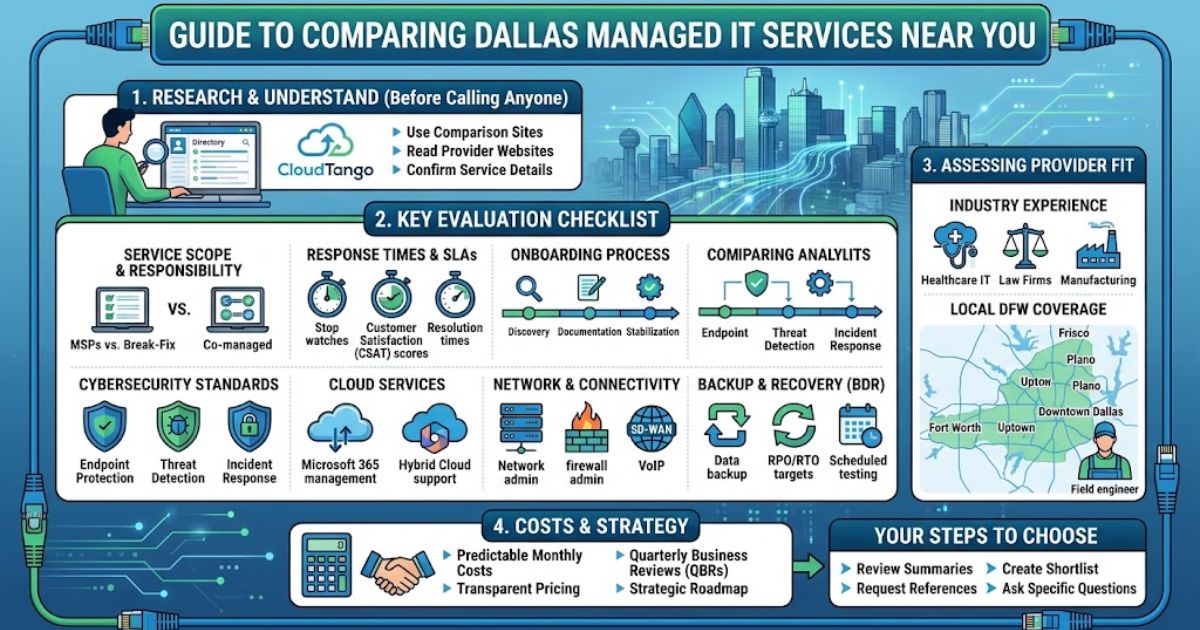
Look for clear scope, stated response times, and proof of the services you need. Confirm the team offers remote IT support, onsite IT support, IT consulting, and technical consulting. Then test every IT help desk and 24/7 help desk support claim against a number.
Resultant states a 96.6% customer satisfaction (CSAT) rating, and Prototype IT states an 82% first-call resolution rate. ITAdOn lists a 15-minute critical response time and a four-hour onsite response time, while ITECS states one-hour and four-hour targets for Pro and Elite and calls them targets, not guarantees. Ask whether a number means a response or a ticket resolution, and read the service level agreements (SLAs) closely.
How does onboarding work when I switch providers?
Onboarding means the provider inventories your systems, documents them, and stabilizes problems before regular service starts. ITAdOn describes a 90-day onboarding plan that covers discovery, documentation, stabilization, and security hardening. That timeline gives you a concrete benchmark to request from every other provider.
Anyone switching IT providers should request IT documentation and knowledge transfer early, so nothing lives in one person’s head. ITAdOn says it handles infrastructure stabilization during transitions, and ITECS says assigned engineers work from maintained documentation. ITAdOn, ITECS, and Contigo each link a client portal or dashboard for tickets.
Which cybersecurity services should a provider cover?
Expect endpoint protection, threat detection, and a plan for incident response at minimum. Stronger programs add managed detection and response (MDR) and SIEM monitoring. Ask which of these come standard and which carry extra charges, because plans differ widely from one Dallas company to the next.
ITECS includes endpoint detection and response (EDR) in all three plans and bundles email security and multi-factor authentication (MFA) with Elite. ITAdOn lists EDR, MDR, phishing simulation, and security awareness training. Its page also names ransomware protection and defenses against insider threats.
Which advisory and testing services help?
A virtual CISO (vCISO) supplies executive-level security guidance without a full-time hire, and a security operations center (SOC) watches alerts around the clock. ITAdOn lists both a vCISO service and managed SOC services. Resultant states that it includes cybersecurity within its managed offering.
Ask for a risk assessment early, then check vulnerability management, a vulnerability assessment, and penetration testing, since each answers a different question. ITECS links service pages for assessments and testing, and ITAdOn lists cybersecurity consulting. Confirm who configures the managed firewall and who explains email authentication (SPF, DKIM, DMARC) in plain language.
Which cloud services should a provider cover?
Check for cloud migration, managed cloud hosting, and Microsoft 365 management if your staff relies on email and shared files. Ask whether support covers hybrid cloud and public cloud management as well as private cloud hosting. ITECS lists all three environments on its Dallas page.
ITAdOn lists Microsoft Azure, Azure Virtual Desktop, and Windows 365 for a hybrid and remote workforce, and Resultant names AWS, Azure, and GCP. Request details on virtual desktop hosting, cloud infrastructure, application hosting, and server management, and name Google Workspace or hosted email if you depend on them. Prototype IT lists cloud migrations, hosting, and storage.
Which network services belong in the contract?
Expect network monitoring, managed network services, and firewall administration at minimum. ITECS lists wireless network configuration and VPN management among its scoped services, and it names switch configuration too. Resultant and Prototype IT both list network support, so compare their descriptions line by line.
Larger networks may need a network operations center (NOC), SD-WAN, or structured cabling during office moves and IT relocations. ITAdOn lists a managed NOC and cabling, and CloudTango’s profile for Magna5 mentions SD-WAN. Also check VoIP and business phone systems, which ITAdOn lists, plus mobile device management (MDM) and workstation lifecycle management, which ITECS lists.
How do backup and disaster recovery protect my business?
Backup and disaster recovery (BDR) protects your data, and business continuity planning protects your operations. ITAdOn attaches specific recovery point objective (RPO) and recovery time objective (RTO) targets to its automated backups. Those two numbers show how much data you can lose and how long you can wait.
Ask whether the provider runs automated backups, stores off-site backup copies, and tests data recovery on a schedule. ITECS bundles cloud and workstation backup with Elite and adds quarterly BDR audits, while Contigo states instant backup and recovery. Every plan aims at downtime prevention, but only a recovery test proves it, so ask to watch one.
Which compliance frameworks should a Dallas provider know?
Match the provider’s experience to your rules, such as HIPAA compliance, CMMC compliance, or PCI compliance. ITAdOn lists all three on its Dallas support page. Contigo states SOC 2 compliance and displays a SOC 2 Type 2 audit badge on its site.
Compliance management covers policies and evidence, compliance monitoring continues between audits, and audit-ready IT keeps records current. ITECS separates compliance readiness work from ongoing support, which helps regulated industries scope each piece. Ask whether a compliance readiness assessment comes first.
Which industries and business sizes do these providers serve?
Dallas providers publish industry pages for fields such as healthcare IT, law firms, manufacturing, and construction. ITAdOn lists those four plus financial services, logistics, and local government. Match your field to a provider’s published examples before you shortlist anyone, because relevant experience shortens onboarding.
ITECS also lists oil and gas, commercial real estate, accounting firms, nonprofits, and education. ITAdOn lists pages for small businesses, mid-sized businesses, and enterprise IT needs. A small office may need mainly a help desk, while a multi-site company may need IT project services and IT systems integration.
Which Dallas neighborhoods and cities do local providers cover?
Local coverage matters when a server fails and someone must arrive in person. ITAdOn names Downtown Dallas, Uptown Dallas, Deep Ellum, and Oak Lawn among the areas it serves. Contigo’s Dallas office sits on Oak Lawn Avenue, which suits companies nearby.
ITECS lists service areas in Plano, Irving, Frisco, Richardson, Fort Worth, and Addison. Resultant and Prototype IT both list Dallas offices on Noel Road, and they reach other North Texas cities such as Arlington and Lewisville. Providers across Dallas-Fort Worth (DFW) often cover the whole region, so ask which engineer drives to your site.
What do the Dallas brands state on their own websites?
Each brand offers the services listed on its own website, so treat this section as a map, not a contract. ITECS states it has served Dallas-Fort Worth since 2002 and describes separately scoped virtual CIO (vCIO) work. ITAdOn describes AI-enabled IT with Microsoft Copilot and Microsoft Defender, and its partner badges include Cisco, Sophos, and Dell Technologies.
Contigo Technology offers chat-based support (Teams, Slack) and cites IT automation for faster tickets. Resultant lists data services with data analytics, and Prototype IT lists consulting with a vCIO and TAM, plus hardware procurement. CloudTango works as a directory, not a provider, so use it to compare candidates and then read each company’s own site.
How much do managed IT services cost, and what else do they cover?
Costs vary by headcount, device count, coverage hours, and security scope, so no single number fits every office. ITECS publishes plan rates on its Dallas page, while Contigo describes clear upfront pricing. Ask whether your quote gives predictable monthly costs or open-ended hourly billing.
ITAdOn lists IT procurement, software licensing, and IT staffing in its menu, and ITECS lists procurement assistance. Ask about vendor management if you juggle many suppliers, and about an IT assessment if you need a baseline. I tell readers to request line items, because bundled and separate charges differ and a low headline rate can hide extra charges.
Is switching to a managed provider worth it?
It pays off when downtime, security gaps, or staffing limits cost more than the service. Contigo cites a range of $137 to $427 per minute for small-business downtime, which it draws from a Pingdom source. Weigh that figure against your own monthly fee, your staff headcount, and the hours your business actually depends on its systems.
Uptime also depends on monitoring, patching, and recovery, which a small team rarely covers around the clock. ITAdOn states it cut downtime 40% for a Dallas healthcare clinic, so treat that as a self-reported claim and ask for references. After you switch, review the first quarterly business reviews (QBRs) to confirm that results match promises.
How does this site help me find managed IT services near me?
This site compares Dallas providers on the details that matter, including services, response targets, security, compliance, and coverage area. You read each summary, then open the provider’s own site to confirm it. That process replaces a dozen browser tabs with one organized checklist.
I built the comparison from the provider pages themselves and name only what each page states. Use it to shortlist two or three companies, then ask each the questions from this guide. The neighborhood and city lists above help you judge proximity in a few minutes.
What questions do readers ask most often?
What is the difference between an MSP and an IT help desk?
An MSP manages your technology on an ongoing basis, while an IT help desk answers user requests. Many MSPs include a help desk as one part of the service. ITECS includes help desk coverage in its Pro and Elite plans.
Do managed IT providers work with an existing IT team?
Yes, several do. ITAdOn and ITECS both describe co-managed IT services, where your staff keeps daily tasks and the provider covers monitoring, security, and escalations. Ask for the split of duties in writing, and review it again at each annual renewal with your whole team.
How long does onboarding take?
ITAdOn describes a 90-day plan, while other providers set timelines in their proposals. Ask for dates, owners, and milestones in writing, then compare them across your shortlist. ITECS says its written scope defines covered assets and responsibilities before work begins.
Which security tools should a provider include?
Ask for endpoint detection and response (EDR), multi-factor authentication (MFA), email security, and threat detection. ITECS and ITAdOn list these capabilities at different plan levels. Confirm which ones your plan includes before you sign anything, and compare tiers side by side before choosing.
Where should I start my search for managed IT services near me?
Start with the checklist in this guide, which covers scope, response targets, security, backup, compliance, and coverage area. Then use my site to compare Dallas managed IT services side by side and open each provider’s page to confirm details. Visit my site first, because it puts the checks, the brands, and the local coverage in one place.