

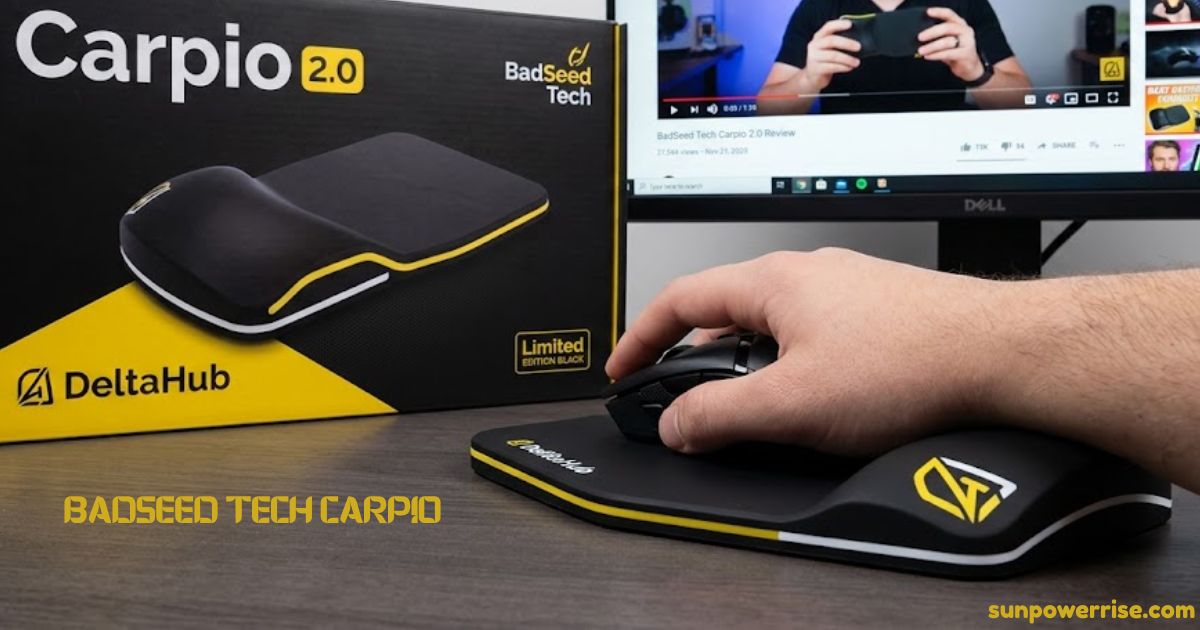
The badseed tech carpio moves with your hand, while a conventional wrist rest sits still on your desk as your hand moves around it. It slides under your lower palm every time you move the mouse. This compact ergonomic wrist support is built for mouse use, and it costs $34.90 per unit.
Many people see the search term and expect an electronic gadget or some software, but this product is neither. It is a creator-collaboration edition of DeltaHub’s Carpio 2.0, finished in black with exclusive BadSeed Tech replaceable pads. The engineering stays the same, so only the look changes and the mechanism does not.
This limited-edition dark colorway launched on December 12, 2025, after a partnership with a YouTube channel. It uses an ABS plastic base, silicone contact pads, and PTFE gliders so the rest moves with your hand. You can pick small at 8.4 x 3.6 cm or large at 9.6 x 4.0 cm, for your left hand or right hand.
What Is BadSeed Tech Carpio?
DeltaHub is a Slovenia-based ergonomics company, and it makes the Carpio 2.0. BadSeed Tech is the technology creator brand behind the creator-collaboration edition, and the team covers PC hardware, peripherals, and desk-setup content. This is not an electronic gadget, a mouse, or software, but a compact ergonomic wrist support with exclusive replaceable pads in black.
Some reports name Brian Phillips as the person who runs this hardware review channel. The creator brand also covers hardware, mobile devices, and gaming audio, and its official website shows current videos with the slogan “TECH VIDEOS. ALL KILLER. NO FILLER.” That positioning explains why the creator partner fits so well with a desk accessory.
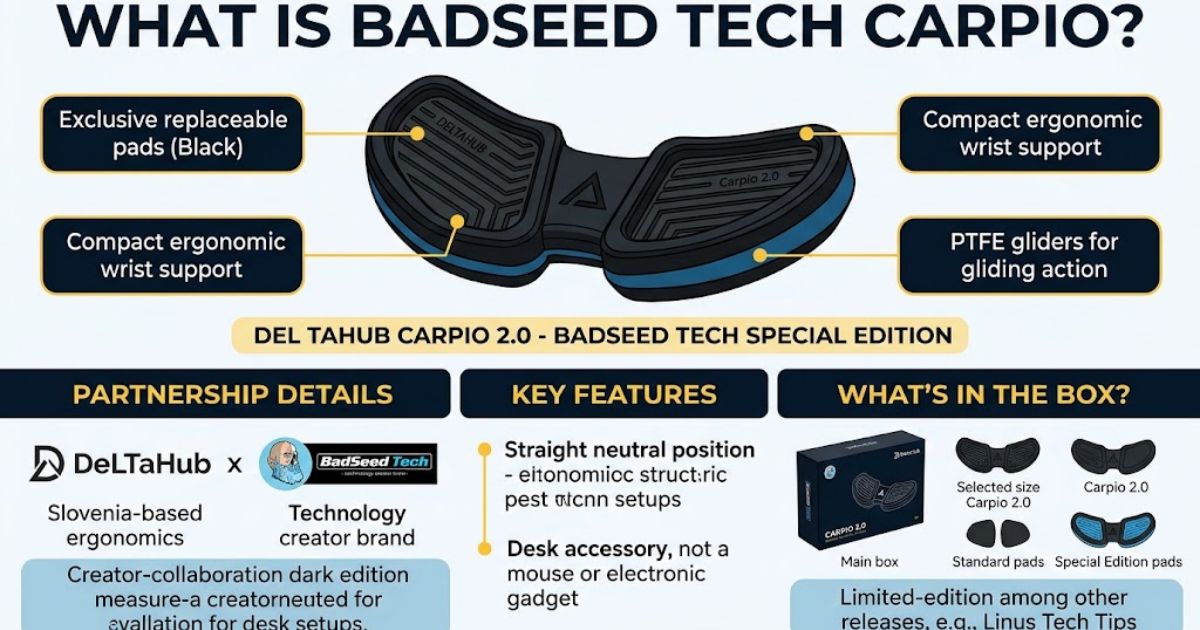
BadSeed Tech did not invent a new wrist-rest platform, because DeltaHub owns the Carpio product family. The product listing says the box holds a selected size, standard pads, and the BadSeed Tech Special Edition pads, which makes it a limited-edition version among other special Carpio releases. Creator collaborations like this one also exist with Linus Tech Tips, so a durability report or comfort report for the regular model carries over.
The collaboration gives a dark edition for black and dark blue desk setups, and it changes the color scheme and pad design. The base, materials, and gliding action stay the same, so the engineering matches the standard model, and that clears up the confusion. The PTFE gliders still help your mouse hand travel while you keep a straight neutral position, and the official pages back this up.
How Does BadSeed Tech Carpio Work?
Your palm rests on two soft pads, and low-friction PTFE feet let the unit glide across a desk mat or desk surface. Instead of anchoring your wrist in one spot, the support follows your mouse movement. It uses no batteries, software, sensors, Bluetooth, or USB, so it is a purely mechanical desk accessory.
Smooth surfaces work best, and neoprene or felt desk mats are good picks. A rough surface or sticky surface slows the glide and spoils the idea. Traditional foam wrist rests and gel wrist rests stay fixed, so during larger mouse movements your hand leaves them or your wrist pivots against the stationary support.
The Carpio sits under the heel of palm on a contoured support, and it keeps your wrist raised. It slides with you, so your hand and forearm stay aligned. You can see it in four steps: sit on the support, keep the wrist up, slide with the mouse, and keep the arm in line.
That is why floating wrist rest and gliding wrist rest describe it better than conventional padded wrist rest. DELTAHUB designed the Carpio 2.0 so it travels across the surface under your hand. In my view, that small change makes the whole product feel different.
Why the Carpio Design Is Different
A foam wrist rest or gel wrist rest stays in one place while your hand crosses the mouse pad. The badseed tech carpio lets the support slide with your hand, so your palm supported stays under the weight and your hand and forearm move as one. DeltaHub says the shape moves pressure off the carpal area and onto the stronger parts of the palm.
The company also says medical experts gave input on the ergonomic design. Those claims describe the product, and they are not a diagnosis, a treatment, or a guarantee that a wrist problem will go away. Computer ergonomics aims for a neutral wrist position, where your wrist lines up with your forearm instead of bending upward, downward, or sideways.
OSHA, short for the U.S. Occupational Safety and Health Administration, backs mouse positioning that keeps a straight posture. It warns that repeated bending and prolonged force cause hand and arm fatigue and raise musculoskeletal injury risk. Its workstation guidance wants hands, wrists, and forearms parallel to the floor.
A support alone never fixes a bad setup, because desk height, chair position, mouse placement, keyboard position, and working habits all count. A static wrist rest props you in one spot, while a gliding rest gives less anchoring and a better chance at neutral posture. This is no gadget trend, because neutral posture is the baseline of any good setup.
Sizes (Small or Large)
DeltaHub offers Small at 8.4 × 3.6 cm, which is 3.3 × 1.4 in, and Large at 9.6 × 4.0 cm, which is 3.8 × 1.6 in. A size guide helps you choose, and Small suits precise movement while Large gives a broader support area for general use. Hand shape and desk setup differ between people, so I would trust the official size guide and ignore age or height.
The current product listing from DELTAHUB also sells by hand orientation, because the shape is not symmetrical. A good fit holds the heel of the palm and keeps your fingers out of an unnatural position. It also avoids pressure underneath wrist.
An undersized support feels unstable and pushes your hand outside the intended contours. An oversized one disturbs your grip position and feels cumbersome. Treat size as an ergonomic consideration and skip the habit of grabbing the bigger one.
How to Use It
Put your palm, not your wrist joint, on the pads, and do not press down hard. Give your elbow elbow support from a chair armrest or the table. Pick a smooth surface such as a felt desk mat or neoprene desk mat.
Check height alignment next, because tall keyboards and vertical mice can leave the Carpio too low. DeltaHub sells height-adjustment accessories for this. Place the heel of the palm on the support, because the fleshy lower part should carry most of the contact.
OSHA gives computer workstation guidance that favors soft rounded supports inside a properly arranged workstation. Keep your mouse close to keyboard and keep pointing devices within easy reach, so your straight wrist stays straight and awkward postures in your shoulder and arm stay away. Use a light touch and avoid a tight grip.
New users sometimes keep the Carpio stationary, which defeats the idea, so let it glide and drop the anchoring habit. Your forearm, wrist, and mouse work as a system. If your desk too high problem lifts the shoulder, or desk too low problem means the wrist bends, fix chair height, arm support, and keyboard position.
What Makes the Edition Different?
The product page from DeltaHub says the special edition of the badseed tech carpio includes a black Carpio 2.0 with standard pads in your chosen size. You also get the BadSeed Tech special-edition replaceable pads. Stock, bundle contents, hand options, and pricing change by region, so read the official product page before buying.
DELTAHUB says the order holds the selected size and standard Carpio pads, plus the extra set. Functionally, nothing changes, and the collaboration-specific presentation carries the distinctiveness. The look fits darker PC setups and gaming setups well.
The aesthetics are nice, but the ergonomic principle stays the same. People sometimes talk about creator editions as new generations, yet they bring no technological upgrades. I would enjoy the style and expect no extra performance.
8. BadSeed Tech Edition vs Standard Carpio 2.0 (vs G2.0)
Both share the same core platform, the Carpio 2.0, with the same gliding concept and PTFE, ABS, and silicone construction. The BadSeed Tech version adds special collaboration pads and collab styling for collector appeal, while the standard one offers standard color options and broader colors. This special-edition presentation leaves the ergonomic mechanism and function alone.
Pick the BadSeed Tech branding or the blue-and-black look if style matters. Both use moving palm support, small and large sizing, and left/right options. The creator branding and extra pads set it apart as mouse-hand support, and the official listing from DELTAHUB confirms the visual treatment only changes the surface.
Shoppers should check the underlying model and not assume every Carpio is equal. The wrist strap gives extra hold and starts at $39.90, which costs $5 more than the $34.90 edition. A $60 pair comes after a 15 percent bundle discount.
Reviewers agree that the edition adds personality and no new mechanics. The strap helps if your hand drifts off a free-gliding unit. A static foam or gel rest stays cheap but has no moving parts and a fixed position.
| Product | Primary strength | Key spec | One-time price |
| BadSeed Tech Edition | dark look, dark colorway | PTFE, ABS, silicone | $34.90 |
| Standard Carpio 2.0 | Same core, no successor change | Same glide | Check DeltaHub |
| Carpio G2.0 | Strap | Gliding base | $39.90 |
Who Should Buy and Who Should Skip
Gamers, editors, designers, students, programmers, office workers, and other desk-based users all gain from a mouse support like the badseed tech carpio. A fixed wrist rest feels restrictive to some, and they like a small support that follows mouse movement. BadSeed Tech ties closely to PC peripherals, yet the Carpio 2.0 idea fits more than gaming.
Video editors, content creators, PC gamers, remote workers, CAD artists, and 3D software users do frequent mouse-based tasks too. Their shared point is prolonged computer use. Someone in spreadsheets for eight hours makes as many repetitive pointer movements as someone gaming for several hours.
High keyboards, vertical mice, rough desk surfaces, and unusual mouse grips need extra care with height and placement. The unit moves, so expect an adjustment period. Buy it for long stretches of mouse work, a low keyboard, and the dark look, and give it a couple of weeks because the price keeps the risk small.
Skip it if you own a tall keyboard and refuse the riser. Skip it if hand symptoms exist, and see a clinician first, because an accessory is no treatment. Skip it too if you want better performance than the standard Carpio 2.0.
Things to Consider Before Buying
Comfort stays personal, so a design that suits one user may annoy another. Height alignment matters with tall keyboards, vertical mice, and ergonomic mice. The gliding experience also depends on the surface.
Regional price and stock change, so official listings beat old review prices. An ergonomic accessory never replaces medical care when persistent pain, numbness, weakness, or any ongoing problem shows up. Use keyboard height as your main check, because a front edge above 1.5 cm makes a wrist rest sit too low, which is the top reason for a return, and reviewers flag it.
Measure with a ruler, and plan for the Carpio Mods riser. Mechanical keyboards with thick cases and tall keycaps often pass that number, so add it to your budget. Expect an adjustment period, because it feels unlike a foam block.
Judge it after a couple of weeks of normal work and not after one afternoon. The rest moves under hand, and your muscles need time to adapt. Patience pays off here.
FAQs
Is BadSeed Tech Carpio a mouse?
No, the BadSeed Tech Carpio is no mouse. It is a wrist support and palm support. You place it used next to a mouse.
Who makes the BadSeed Tech Carpio?
DeltaHub makes the Carpio platform. The collaboration with BadSeed Tech produced the edition. The team shares credit.
Does it need software or charging?
It needs no software and no charging. It is a mechanical accessory. No electronic setup exists.
What is it made from?
DeltaHub lists PTFE gliders, an ABS base, and silicone pads. These parts make up the Carpio 2.0. Each one has a clear role.
Does it move with your hand?
Yes, the support will glide with hand and arm movement. That is the defining feature. It works as designed.
What sizes are available?
DeltaHub lists Small at 8.4 × 3.6 cm and Large at 9.6 × 4.0 cm. Pick by the guide. Both fit left and right hands.
Can it work with a mechanical keyboard?
It fits a mechanical keyboard only if keyboard height allows. DeltaHub says a front edge above 1.5 cm makes the Carpio sit too low. An additional height solution fixes that.
Can it cure carpal tunnel syndrome or RSI?
It cannot act as a medical cure for carpal tunnel syndrome or RSI. It is an ergonomic accessory. Bring persistent pain, numbness, or weakness to a qualified health professional.
Is the BadSeed Tech edition functionally different from Carpio 2.0?
The official listing shows a black Carpio 2.0 with special BadSeed Tech pads. The core platform stays the same. Functionally, it matches.
Where should I check price and availability?
Open the official product page from DeltaHub. Price, currency, bundles, stock, and region change over time. Availability can shift quickly.